WhatsApp conversion tracking for Google Ads

WhatsApp is one of the most popular ways for customers to get in touch, but its end-to-end encryption makes it hard to track properly in Google Ads. This guide walks through the workaround I used for a client to turn WhatsApp clicks into a conversion Google could actually optimise for.
One thing first: this is a workaround, not a foolproof tracking solution. It gives Google a much better signal than raw button clicks, but it can’t confirm that every conversation started.
Optimising for WhatsApp button clicks alone teaches Google to find people who tap, not people who enquire
Time on page and scroll depth help qualify users
Combine the conditions in a Google Tag Manager trigger group
Keep checking conversions against real chats in your CRM
Background
WhatsApp is built into Meta’s platforms and available in some Google Ads formats, so it’s a natural way for customers to reach you. It’s a great way to engage with people, keep communications secure and make it easy for potential customers to get in touch.
The catch is the encryption. Because conversations are private, Google Ads has no way of knowing whether a click on your WhatsApp button turned into a real chat. That makes it difficult to optimise campaigns around WhatsApp leads.
What you need
A dedicated WhatsApp number
Ideally one for each campaign or PPC landing page, so you can tell where chats come from.
A CRM or lead log
A way of recording the date and time of each WhatsApp lead, so you can count them daily.
Google Tag Manager
To set up the event tracking and the triggers that qualify each user.
Google Ads conversion tracking
So qualified WhatsApp clicks can be counted as conversions in your campaigns.
Google Analytics 4
To analyse engagement and find the right thresholds for your landing pages.
Initial setup
In Google Tag Manager, create a click event that fires whenever someone clicks your WhatsApp button or starts a chat, for example through a plugin such as Join.chat. This gives you initial data on WhatsApp clicks that you can view in GA4.
Most PPC managers would then set up a conversion for those button clicks and stop there.
If you optimise for clicks alone, you teach Google to find people who tap the button rather than engaged users who are more likely to enquire. It looks good in the platform, but you probably won’t see more real WhatsApp leads. You need a condition that qualifies the user as well.
Qualifying users
What worked for me was setting a couple of conditions that mark a user as qualified.
Time on page
I added event tracking on each PPC landing page at 10, 20, 30, 40, 50 and 60 seconds. A GA4 exploration combining time on page with WhatsApp clicks showed how long people typically stayed before clicking, and where engagement peaked.
Scroll depth
I also added scroll tracking to the landing pages, to see how far down the page people scrolled and where most of them clicked a WhatsApp button.
The conversion solution
The data showed that most engaged users spent 20 to 30 seconds on the landing page and scrolled around 20 to 30 percent of the way down before dropping off.
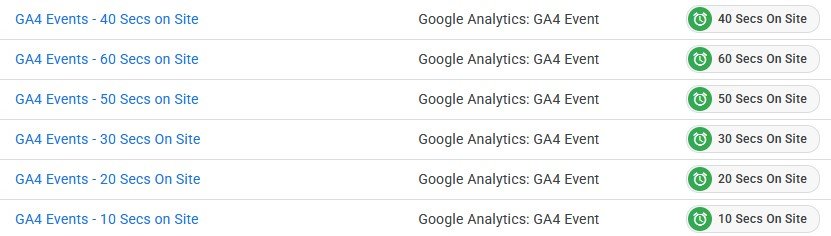
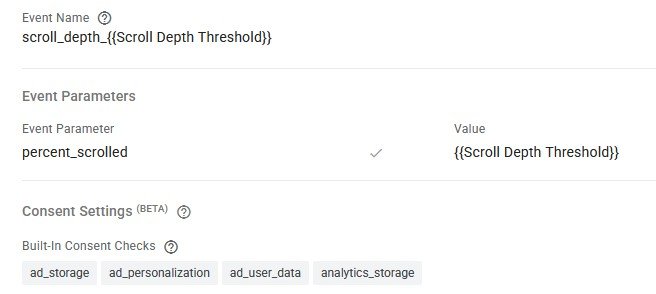
From this, I set up a trigger group in Google Tag Manager that only fires a conversion when all three conditions are met.
WhatsApp button click
At least 20 seconds on the page
Scrolled at least 20 percent of the page
If a visitor from Google Ads did all three, it counted as a conversion in Google Ads.
The results
Within a week of switching to this conversion, far more of the tracked WhatsApp clicks turned into real conversations, and cost per lead came down, because Google was now optimising towards engaged visitors rather than anyone who tapped the button.
For this client, WhatsApp was the main source of leads. Before, it was a black box with little control beyond raw button clicks. Afterwards, the campaign could be optimised around engaged users, with more accurate data and more consistent leads.
Keep checking the conversions against real chats in your CRM. The thresholds that work for one site won’t be right for every site, so review them once you have a few weeks of data. If you want to set this up yourself, my <a href=”https://mcallisterdigital.co.uk/google-analytics-training/”>GA4 and tracking training</a> covers Tag Manager triggers step by step.
Struggling to track WhatsApp or phone leads?
I can review your conversion tracking and show you where Google Ads might be optimising towards the wrong thing.